Skip to content

Conversation

@renkun-ken
Copy link
Member

What problem did you solve?

Follows #936

@albertosantini
Copy link

albertosantini commented Jan 12, 2022

Thanks. Installing this artifact and I give a new try.

@Yunuuuu
Copy link

Yunuuuu commented Jan 12, 2022

The same with previous build, R.exe cannot work

@albertosantini
Copy link

albertosantini commented Jan 12, 2022

So far I tried two configurations:

  1. "r.rpath.windows": "... rterm path ..."
  2. without "r.rpath.windows" set (no presence in settings)

I followed the usual workflow: loaded R files, edited R files, executed lines, created a R terminal, loaded R workspace, quit from R terminal, switched from R project (intending with R files) and a Nodejs (intending with no R files) and back, and so on.

I don't see leaked processes when I close vscode. So for me it works.

@Yunuuuu What are your steps to reproduce the issue?

@albertosantini
Copy link

It seems magic.
I run a session with configuration 2 (without "r.rpath.windows" set), almost without any action, and the processes have not been closed. Sigh.

I rerun a new session with configuration 1 (with "r.rpath.windows" set) and I give you a feedback.

@Yunuuuu
Copy link

Yunuuuu commented Jan 12, 2022

I used the/path/of/R.exe in my r.rpath.windows setting, and restarted vscode and opened a file with .R extensionn, then closed the vscode window. we can checked the task manager and found a lot of R.term were not killed.

@Yunuuuu
Copy link

Yunuuuu commented Jan 12, 2022

And we changed the setting r.rpath.windows to use the/path/of/Rterm.exe, it can work well

@albertosantini
Copy link

Agreed.

We have three configurations:

  1. "r.rpath.windows": "... RTerm path ..." - the fix works
  2. without "r.rpath.windows" set (no presence in settings) - the fix doesn't work, but it is hard to reproduce it
  3. "r.rpath.windows": "... R path ..." - the fix doesn't work

@albertosantini
Copy link

Again, with configuration 1, after 1 hour of vscode inactivity, while I was in a few video calls, I closed vscode and I opened process explorer (I said myself just in case). Sigh, I noticed those "frontend" processes. Really I have no idea what it is happening.

@renkun-ken
Copy link
Member Author

renkun-ken commented Jan 12, 2022

Looks like in your cases, the taskkill command might be never triggered as the R.exe process exits on its own before we got a chance to kill its tree.

The latest commit adds a log file at ~/.vscode-R/diagnostics.log which shows every step from spawning to terminating. Please use R.exe and try the latest build and put your log here and let's see if taskkill is actually triggered in your cases.

If the spawned process triggers exit and error, we mark the process as not running, then we won't call taskkill for it.

@albertosantini
Copy link

Installed. Thanks a lot.

Tried with Rterm in "r.rpath.windows". It is ok. From diagnostics.log

Process [c:\woot\opt\r\bin\x64\Rterm.exe] (10640) spawned
Process [c:\woot\opt\r\bin\x64\Rterm.exe] (4008) spawned
Process [c:\woot\opt\r\bin\x64\Rterm.exe] (10640) disposing, connected: false, exitCode: null, signalCode: null, killed: false, running: true
Process [c:\woot\opt\r\bin\x64\Rterm.exe] (4008) disposing, connected: false, exitCode: null, signalCode: null, killed: false, running: true
Process [c:\woot\opt\r\bin\x64\Rterm.exe] (4008) terminating
Process [c:\woot\opt\r\bin\x64\Rterm.exe] (4008) disposed, connected: false, exitCode: null, signalCode: null, killed: false, running: true

Now I give a try commenting "r.rpath.windows".

@albertosantini
Copy link

albertosantini commented Jan 12, 2022

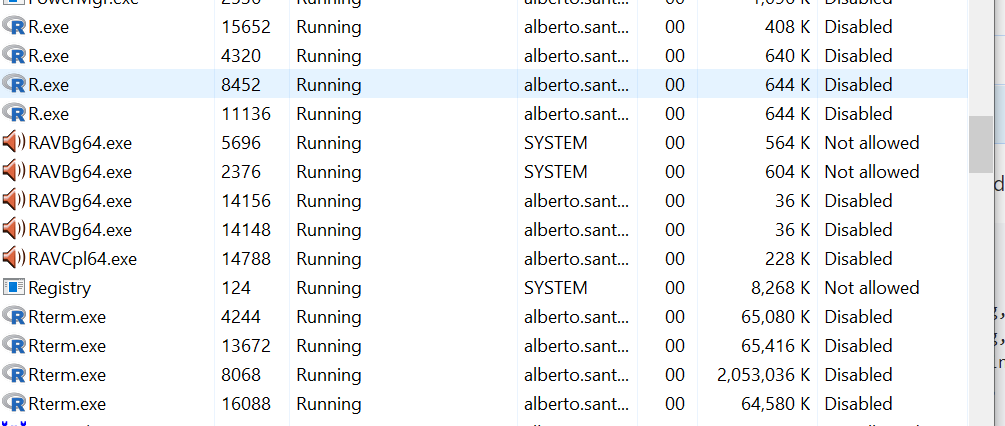
Ok here the log without any set for r.path.windows and with R for Windows... processes left after closing vscode:

Process [C:\woot\opt\r\bin\R.exe] (4060) spawned
Process [C:\woot\opt\r\bin\R.exe] (5164) spawned
Process [C:\woot\opt\r\bin\R.exe] (4060) disposing, connected: false, exitCode: null, signalCode: null, killed: false, running: true
Process [C:\woot\opt\r\bin\R.exe] (5164) disposing, connected: false, exitCode: null, signalCode: null, killed: false, running: true
Process [C:\woot\opt\r\bin\R.exe] (5164) terminating
Process [C:\woot\opt\r\bin\R.exe] (5164) disposed, connected: false, exitCode: null, signalCode: null, killed: false, running: true
Process [C:\woot\opt\r\bin\R.exe] (5220) spawned
Process [C:\woot\opt\r\bin\R.exe] (13272) spawned
Process [C:\woot\opt\r\bin\R.exe] (5220) disposing, connected: false, exitCode: null, signalCode: null, killed: false, running: true
Process [C:\woot\opt\r\bin\R.exe] (13272) disposing, connected: false, exitCode: null, signalCode: null, killed: false, running: true
Process [C:\woot\opt\r\bin\R.exe] (13272) terminating
Process [C:\woot\opt\r\bin\R.exe] (13272) disposed, connected: false, exitCode: null, signalCode: null, killed: false, running: true
Process [C:\woot\opt\r\bin\R.exe] (16056) spawned
Process [C:\woot\opt\r\bin\R.exe] (9144) spawned
Process [C:\woot\opt\r\bin\R.exe] (16056) disposing, connected: false, exitCode: null, signalCode: null, killed: false, running: true
Process [C:\woot\opt\r\bin\R.exe] (9144) disposing, connected: false, exitCode: null, signalCode: null, killed: false, running: true

image

@albertosantini
Copy link

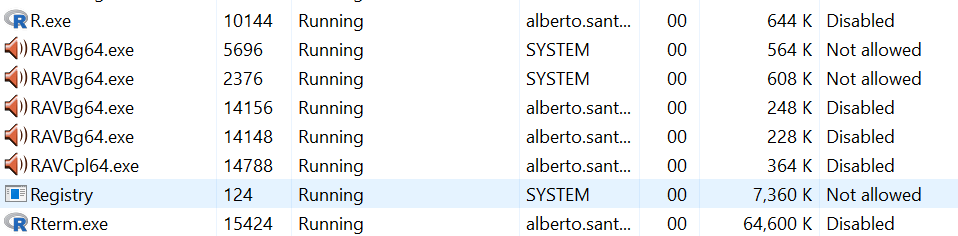
Ok. Next try. I manually killed all the processes (R.exe and Rterm.exe) and started again vscode, played a bit and closed it.

Here the log and the process.

Process [C:\woot\opt\r\bin\R.exe] (10760) spawned
Process [C:\woot\opt\r\bin\R.exe] (15664) spawned
Process [C:\woot\opt\r\bin\R.exe] (10760) disposing, connected: false, exitCode: null, signalCode: null, killed: false, running: true
Process [C:\woot\opt\r\bin\R.exe] (15664) disposing, connected: false, exitCode: null, signalCode: null, killed: false, running: true
Process [C:\woot\opt\r\bin\R.exe] (15664) terminating
Process [C:\woot\opt\r\bin\R.exe] (15664) disposed, connected: false, exitCode: null, signalCode: null, killed: false, running: true

image

The processes 10144 and 15424 left behind are not in the log. Interesting.

@albertosantini
Copy link

Another day, other thoughts. ;)

Using R.exe, it is very easy to reproduce the issue: start vscode, edit a an R file, close vscode and give a look at details of process explorer: there are leaked R.exe and Rterm.exe processes.

If taskkill approach is correct (I think so), just putting apart the comments about RTerm.exe, I was wondering if the problem is not HOW to dispose the resource, but WHEN. I don't know the lifecycle of a vscode extension, but is it plausible to say there is some sort of race condition when closing a project (or switching to another project), that the disposing function have no time to complete the task?

@renkun-ken
Copy link
Member Author

Thanks for the thorough testing!

In my testing, the log looks quite weird:

Process [C:\Program Files\R\R-4.1.2\bin\R.exe] (10340) spawned
Process [C:\Program Files\R\R-4.1.2\bin\R.exe] (11000) spawned
Process [C:\Program Files\R\R-4.1.2\bin\R.exe] (10340) disposing, connected: false, exitCode: null, signalCode: null, killed: false, running: true
Process [C:\Program Files\R\R-4.1.2\bin\R.exe] (11000) disposing, connected: false, exitCode: null, signalCode: null, killed: false, running: true

The terminating and disposed status never appear, but the R.exe and other processes are indeed terminated. Looks like they are not killed by the taskkill code but something else?

@albertosantini
Copy link

Here trying to debug the extension, just to understand why log lines, terminating and disposed, are not printed.
I am sorry for my limited knowledge.

If an extension needs to dispose a resource, it needs to add the disposing function to the so called extension subscriptions; then, when vscode exit, or the extension is unloaded, those functions are called and the objects are disposed.

Basically we have in util.ts:

  • asDisposable function to associate the object to dispose to a function and to add it to the subscriptions
  • exec function to execute a spawned process
  • const disposable = asDisposable(proc, () => { inside exec function as disposing handler

Eventually exec is called in languageService.ts to start R language server.

If I set a breakpoint inside the disposing handler (where there are the log lines), for example just after the taskkill line, the execution is halted at the breakpoint. So far it is ok. What I noticed after a few seconds the execution is halted and, maybe, while I had been exploring the values of the variables, suddenly the debugger is stopped and the whole process exits.

So I was wondering if there is an high-order logic about disposing lifecycle, limiting the time where the disposing function in the subscription is executed. I tried to give a look at vscode docs, but, weirdly, I didn't find any relevant info about this topic.

I say it in the wrong way: like when the callback of a promise is not executed until the end, because the main process is suddenly terminated.

Also this would explain the different behaviours for the different users (R.exe vs. Rterm, the printed log lines): it depends how fast the local machines are and it depends on the context of the language server (loaded files and so on).

Basically I am afraid the disposing logic is not robust, but I don't see the failure point (in the extension or in vscode).

@albertosantini
Copy link

Thanks for opening the issue in the "upstream".
Just after a few hours, it finally seems it is not an isolated case.

Anyway my next steps are starting from the hello world extension and adding the basic disposing logic, hoping to highlight some difference with this case.

@albertosantini
Copy link

Breaking News. The fix is "easy". Use the sync version of spawn for taskkill:

cp.spawnSync('taskkill', ['/pid', proc.pid.toString(), '/f', '/t']);

otherwise the dispose function is terminated, when quitting vscode, before the spawned taskkill killed all the subprocesses.

Details later.

@renkun-ken
Copy link
Member Author

Thanks for the fix! I tested it and it works magically 👍

@albertosantini
Copy link

Perfect! Thanks @renkun-ken for this awesome extension.

It works with all scenarios of testing (switching project, creating terminals, opening editors and so on) and configurations (with or without r.path.windows set). No orphans processes in sights.

At least for me, I hope other users can confirm it.

TLDR; Troubleshooting History

Starting from these quotes:

From @renkun-ken

Looks like in your cases, the taskkill command might be never triggered as the R.exe process exits on its own before we got a chance to kill its tree.

From @albertosantini

I say it in the wrong way: like when the callback of a promise is not executed until the end, because the main process is suddenly terminated.

I cloned the hello world extension and replaced the content of extension.ts fil with this code:

// The module 'vscode' contains the VS Code extensibility API
// Import the module and reference it with the alias vscode in your code below
import * as vscode from 'vscode';

import * as cp from 'child_process';

let extensionContext: vscode.ExtensionContext;

// this method is called when your extension is activated
// your extension is activated the very first time the command is executed
export function activate(context: vscode.ExtensionContext) {
    // Use the console to output diagnostic information (console.log) and errors (console.error)
    // This line of code will only be executed once when your extension is activated
    console.log('Congratulations, your extension "helloworld-sample" is now active!');

    // assign extension context to global variable
    extensionContext = context;

    // The command has been defined in the package.json file
    // Now provide the implementation of the command with registerCommand
    // The commandId parameter must match the command field in package.json
    const disposable = vscode.commands.registerCommand('extension.helloWorld', () => {
        // The code you place here will be executed every time your command is executed

        // Run R executable
        startR();
    });

    context.subscriptions.push(disposable);
}

function startR() {
    const command = 'C:\\woot\\opt\\r\\bin\\R.exe';
    // const command = 'C:\\woot\\opt\\r\\bin\\x64\\R.exe';
    // const command = 'C:\\woot\\opt\\r\\bin\\x64\\Rterm.exe';
    const proc = cp.spawn(command, ["-q", "-e", "Sys.sleep(300)"]);

    vscode.window.showInformationMessage(`Proc started: ${proc.pid}`);

    asDisposable(proc, () => {
        cp.spawnSync('taskkill', ['/pid', proc.pid.toString(), '/f', '/t']);
    });
}

function asDisposable<T>(toDispose: T, disposeFunction: (...args: unknown[]) => unknown): T & vscode.Disposable {
    type disposeType = T & vscode.Disposable;
    (toDispose as disposeType).dispose = () => disposeFunction();
    extensionContext.subscriptions.push(toDispose as disposeType);

    return toDispose as disposeType;
}

My workflow was starting a debugging session of the extension, opening the command palette, executing Hello World command, which started an R command (sleeping for 5 minutes); then I closed the session and with the task manager opened I saw the results: orphans or not orphans processes.

I played with different approach: with spawn or with exec, with libraries killing processes (fkill, tree-kill, taskkill, etc.), with another native kill executable (pskill). Just to understand if the problem was related with R.exe (32bit or 64bit) or Rterm.exe, with the way I killed the processes, with the disposing logic of the extension or vscode.

During the journey, I learned you cannot use any of the libs out there, to kill a tree of processes in the disposing function, because all use the async approach. Generally speaking, in the disposing function you need to use only a sync approach.

@renkun-ken
Copy link
Member Author

Great finding and the details!

If @Yunuuuu could confirm it also works, we could merge this PR (again).

@Yunuuuu
Copy link

Yunuuuu commented Jan 15, 2022

Perfect! Thanks for the excellent method! I have tested it can work for both Rterm.exe and R.exe

Sign up for free to join this conversation on GitHub. Already have an account? Sign in to comment

Labels

None yet

Projects

None yet

Development

Successfully merging this pull request may close these issues.

3 participants