Add support for highlight selection and onAction to TableView and ListView #2363
Conversation


add demo stories
fix clicking without shift
* Mobile updates for selection

* Move mobile awareness to the component

* fix lint

* move to touch/vo detection
* Select on focus first time in collection

* fix lint

* Only start selecting on first focus if selectOnFocus is on

* add a test

* fix aria

* fix lint

* remove dead code

* fix lint

…/react-spectrum-v3 into highlight-selection

# Conflicts:
#	packages/@react-spectrum/table/stories/Table.stories.tsx
…o highlight-selection
…o highlight-selection

|
Build successful! 🎉 |

 LFDanLu
left a comment
LFDanLu
left a comment
LFDanLu
left a comment
There was a problem hiding this comment.
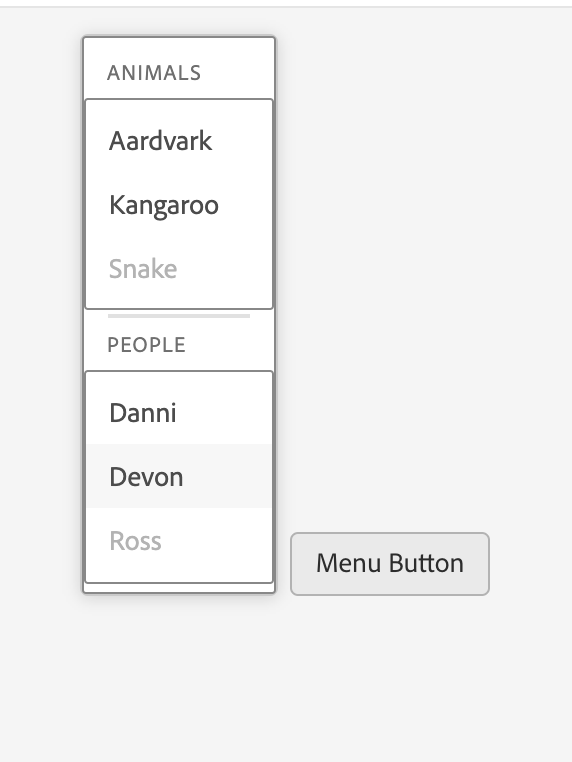
Menus also look weird after the merge with main:
| onLongPress(e) { | ||
| if (e.pointerType === 'touch') { | ||
| onSelect(e); | ||
| manager.setSelectionBehavior('toggle'); | ||
| } | ||
| } |
There was a problem hiding this comment.
Say there is the following scenario:
- The user long presses on a ListView in mobile and selects a couple row to perform some bulk action.
- The user then presses some button outside of the ListView to execute said bulk action.
How is the user supposed to exit from the "toggle" selection behavior? I know that you mentioned deselecting all the rows will flip it back to the original "replace" behavior, perhaps we should provide a "select all" checkbox like TableView has if selectionMode is "multiple".
Hmm, perhaps the external bulk action action would set selected keys to an empty array, aka handled by the application
There was a problem hiding this comment.
Also, should this have an accessibilityDescription added here?
There was a problem hiding this comment.
Yeah setting the selectedKeys back to empty should clear it. As for accessibilityDescription, that's one of my questions in the pr description. Unfortunately, VoiceOver doesn't read aria-describedby on a gridcell...
| // Pressing the Enter key with selectionBehavior = 'replace' performs an action (i.e. navigation). | ||
| let onKeyDown = hasSecondaryAction ? (e: KeyboardEvent) => { | ||
| if (e.key === 'Enter') { | ||
| onAction(); |
There was a problem hiding this comment.
Should onAction be fired if the user pressed option + Enter? I figured that would toggle selection only
There was a problem hiding this comment.
Hmm, where did you get that assumption?
There was a problem hiding this comment.
Well, it just felt a bit inconsistent that other interaction modes have onAction and selection as separate actions (e.g. w/ mouse, you double click to trigger onAction in highlight selection mode and change selection with single click. onAction doesn't fire on single click here).
|
Build successful! 🎉 |
|
Build successful! 🎉 |
LFDanLu
left a comment
LFDanLu
left a comment
There was a problem hiding this comment.
Still haven't tested tableview on mobile, preliminary review
| onLongPress(e) { | ||
| if (e.pointerType === 'touch') { | ||
| onSelect(e); |
There was a problem hiding this comment.
In the "selectionStyle: highlight, onAction" ListView story:
using talkback on android, I'm able to toggle selection on a ListView item via double tapping it a couple of times. This triggers onAction a couple of times (which is expected) and then the item gets the selected styles. If you then perform a long press via tap + tap and hold on a different item, you'll be able to see that the previous item is indeed selected.
For highlight selection + onAction, selection of a list item shouldn't be possible without entering the selection mode view via long press right?
There was a problem hiding this comment.
This seems to happen in the TableView "selectionStyle: highlight, onAction" story as well
There was a problem hiding this comment.
Sounds like a great bug to follow up on. 😉
| &.spectrum-Table-row--highlightSelection { | ||
| border-bottom-color: var(--spectrum-global-color-blue-500); | ||
| } |
There was a problem hiding this comment.
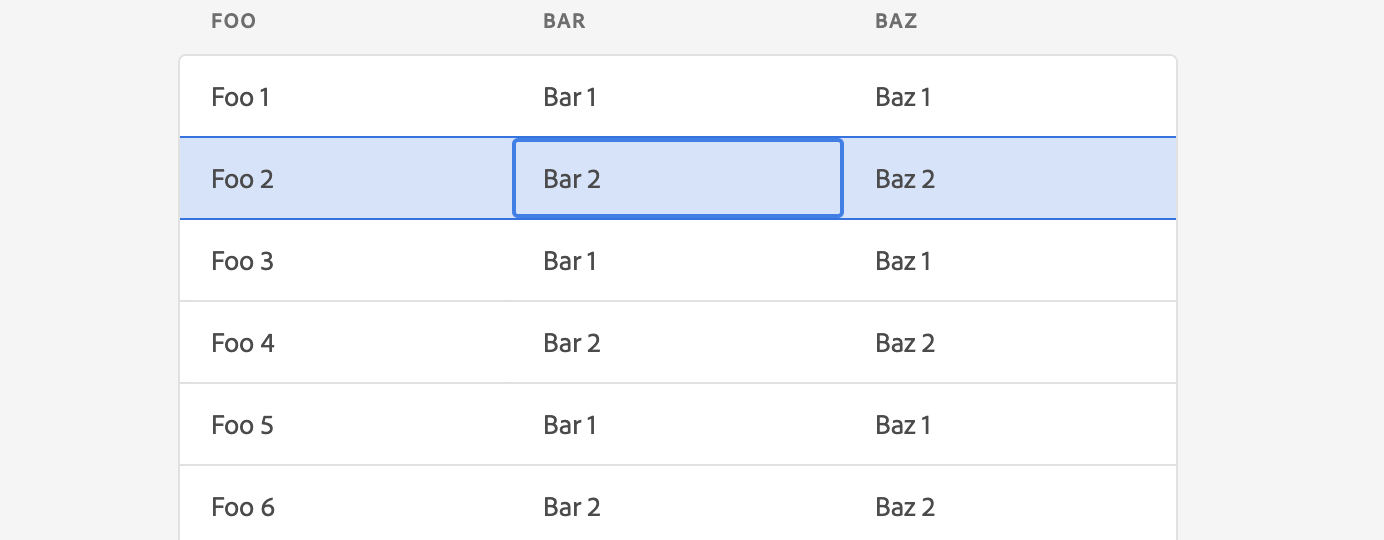
Noticed that the top border is missing when the top most row is selected:

TBH, do we really want this border color when it is selected? It kinda looks strange IMO with the focus ring also applying a border:
There was a problem hiding this comment.
First one will be interesting because it's the border of the whole table, not of the row... Second one is spectrum question
| .add( | ||
| 'selectionStyle: highlight', | ||
| () => ( | ||
| <TableView aria-label="TableView with dynamic contents" selectionMode="multiple" selectionStyle="highlight" width={500} height={400} onSelectionChange={s => onSelectionChange([...s])}> |
There was a problem hiding this comment.
Should onSelectionChange be firing with the same selection when navigating within the currently selected row (e.g. focusing the cells via keyboard) or hitting space a bunch of times? Kinda like how Tabs work I guess so this might be fine
There was a problem hiding this comment.
Yeah it's weird. I tried to get rid of this behavior but it seems a bunch of components rely on it... :/
| 'selectionStyle: highlight', | ||
| () => ( | ||
| <TableView aria-label="TableView with dynamic contents" selectionMode="multiple" selectionStyle="highlight" width={500} height={400} onSelectionChange={s => onSelectionChange([...s])}> |
There was a problem hiding this comment.
In the "selectionStyle: highlight" TableView story, multiple row selection via Talkback only works if you double tap when focusing a cell. If the entire row is focused and you double tap to select it, it actually unselects all previously selected rows and only selects the current row.
| onLongPress(e) { | ||
| if (e.pointerType === 'touch') { | ||
| onSelect(e); |
There was a problem hiding this comment.
This seems to happen in the TableView "selectionStyle: highlight, onAction" story as well
LFDanLu
left a comment
LFDanLu
left a comment
There was a problem hiding this comment.
Tested TableView stories on Android, found 1 extra thing

| let {elementType: ElementType = 'div', onPress, onPressStart, onPressEnd, ...otherProps} = props; | ||
| let {longPressProps} = useLongPress(otherProps); | ||
| let {pressProps} = usePress({onPress, onPressStart, onPressEnd}); | ||
| return <ElementType {...mergeProps(longPressProps, pressProps)} tabIndex="0">test</ElementType>; |

There was a problem hiding this comment.
Order matters here, if longPress is first in the merge, then longPress events will happen first, but if press is first, then press events will happen first
This could be troublesome if we're not careful with it everywhere and consistent, maybe we should have a hook that combines them in the right order? I can't think of a great solution off the top of my head
There was a problem hiding this comment.
You mean onPressStart and onLongPressStart? Where would you expect this to be problematic?
There was a problem hiding this comment.
Just trying to think if others combine it on other components, it might be different component to component
<ComponentA onPressStart={onPressStart} onLongPressStart={onLongPressStart} />
vs
<ComponentB onPressStart={onPressStart} onLongPressStart={onLongPressStart} />
might yield
onPressStart then onLongPressStart for ComponentA
but onLongPressStart then onPressStart for ComponentB
|
Build successful! 🎉 |
 matthewdeutsch
changed the title
matthewdeutsch
changed the title
 devongovett
changed the title
devongovett
changed the title
LFDanLu
left a comment
LFDanLu
left a comment
There was a problem hiding this comment.
Approving, other comments to be handled in followup
|
Build successful! 🎉 |
|
Build successful! 🎉 |


|
Some follow up tickets will be added for this. |


Closes #1638. Closes #1905. Closes #2013. Closes #2018. Relates to: #2266. Relates to: #789.
This implements two features across all collection components (currently TableView and ListView):
selectionBehavior="replace"prop (TBD).useLongPresshook has been added to@react-aria/interactionsto implement this.This also required moving the
usePresscall intouseSelectableItemrather than calling it from each usage site, so there are many changes related to that.To do:
selectionStyle="highlight" vsselectionBehavior="replace"`). Answer: update to use selectionStyle.