Skip to content

Conversation

@AnirudhVIyer
Copy link

@AnirudhVIyer AnirudhVIyer commented Jun 13, 2023

Describe your changes

Modified the TableDescription Class such that now we

  1. check the data for each column ( numeric or categorical)
  2. check a column contains numerical data in str form (this creates Nan issues) and issue a warning
  3. Calculate Mean, Min, Max, Count, STD, percentiles for numeric data
  4. Calculate Unique, Top, Frequency for categorical data
  5. Apply styling to indicate columns with data mismatch
  6. Added formatting so we don't encounter scientific values eg. 1.621e+1

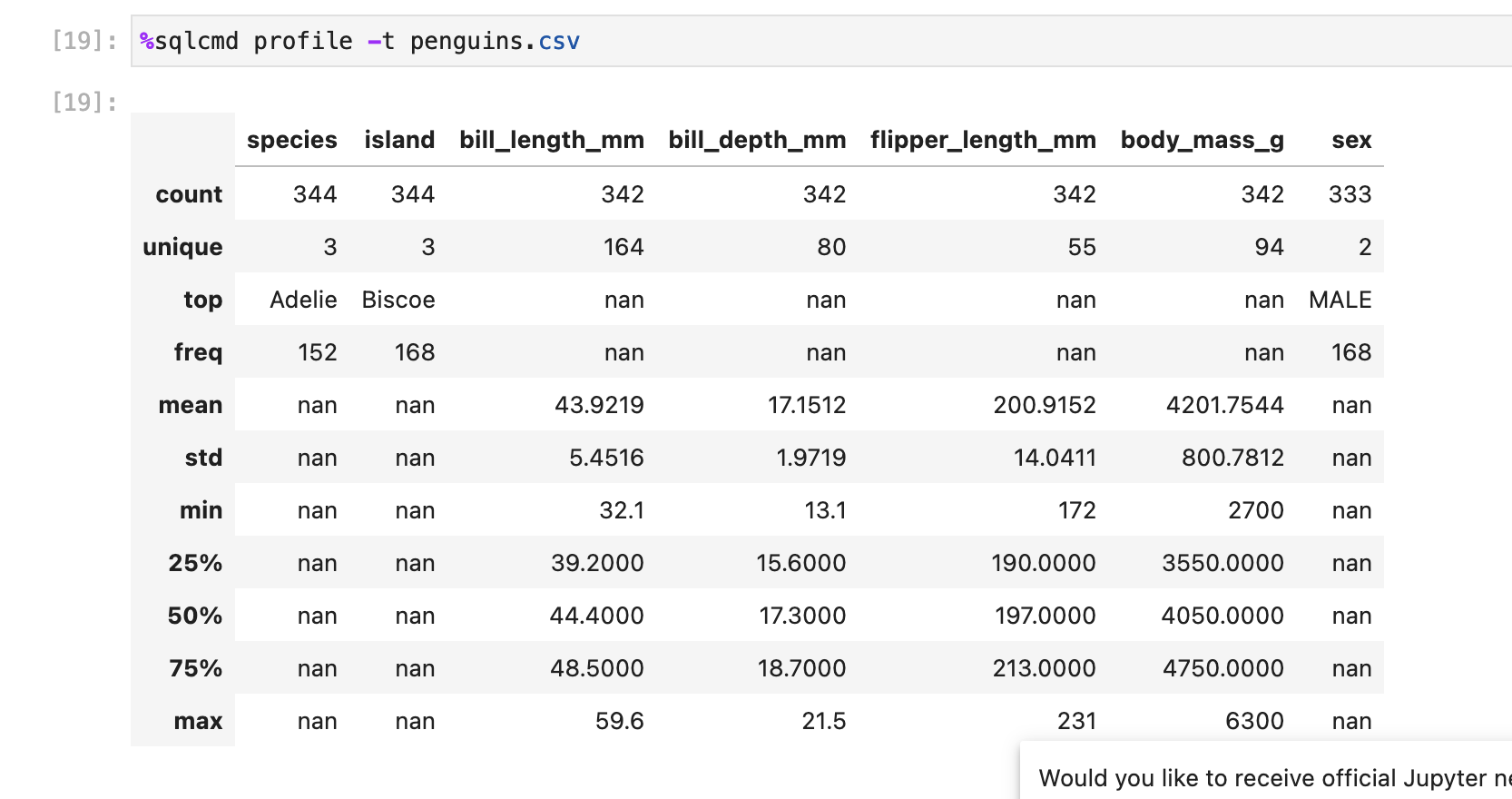
Now the profile command acts similar to the pandas describe function

Jupysql profile

Screenshot 2023-06-13 at 4 34 15 PM

Pandas profile

Screenshot 2023-06-13 at 4 34 28 PM## Issue number

Closes #459

Checklist before requesting a review


📚 Documentation preview 📚: https://jupysql--616.org.readthedocs.build/en/616/


@AnirudhVIyer AnirudhVIyer marked this pull request as ready for review June 13, 2023 22:48
@AnirudhVIyer AnirudhVIyer requested a review from edublancas as a code owner June 13, 2023 22:48
@AnirudhVIyer
Copy link
Author

@edublancas
I checked the way pandas handles profiling using the describe method. And have tried to replicate our TableDescription class that way.

The reason that we see a lot of NaN values is because of the operations that we are running on categorical vs numerical data. In Pandas they handle this in the following way
Type - Operations

  1. Categorical - top unique count freq rest are NaN
  2. Numerical - min max 25% 50% 75% mean unique count``stdev rest are NaN

I have replicated it here, also there is an issue where numerical (int/float) data is stored as a string. Here this data gets treated like categorical data.
In pandas there is no warning for this
We give a message and highlight such a column with a different colour

Copy link

@edublancas edublancas left a comment

Choose a reason for hiding this comment

The reason will be displayed to describe this comment to others. Learn more.

looks great overall!

can we change the red background for yellow? Also, let's add some message below the table explaining why we have the yellow background.

something like "columns A, B, C are categorical, hence median, mean, cannot be computed"

@edublancas edublancas requested a review from mehtamohit013 June 14, 2023 04:23
@AnirudhVIyer
Copy link
Author

looks great overall!

can we change the red background for yellow? Also, let's add some message below the table explaining why we have the yellow background.

something like "columns A, B, C are categorical, hence median, mean, cannot be computed"

Sure! making the changes

@AnirudhVIyer
Copy link
Author

@edublancas made the changes

Screenshot 2023-06-14 at 2 14 06 PM

@AnirudhVIyer AnirudhVIyer requested a review from edublancas June 14, 2023 18:14
@edublancas edublancas requested a review from neelasha23 June 15, 2023 18:38
@edublancas
Copy link

please merge from master, I think the error you're getting got fixed already

@tonykploomber: is the error caused by the mariadb image problem you encountered? because the logs suggest the problem is with oracle

@tonykploomber
Copy link

Seems the latest build with this oracledb error too, however it's not impacted to the testing flow.

I believe rebasing with latest master will solve the issue, however, something we need to check about oracledb

@edublancas
Copy link

@tonykploomber: can you open a dummy PR to master? let's see if things are working. otherwise we'll need to fix oracle as well

@AnirudhVIyer
Copy link
Author

I will rebase and try again.

@AnirudhVIyer AnirudhVIyer requested a review from yafimvo as a code owner June 20, 2023 13:59
@AnirudhVIyer AnirudhVIyer requested a review from neelasha23 June 20, 2023 20:12
@AnirudhVIyer
Copy link
Author

@edublancas ready for review

Copy link

@edublancas edublancas left a comment

Choose a reason for hiding this comment

The reason will be displayed to describe this comment to others. Learn more.

I tried testing this and I was expecting the island column to be yellow and to see the warning message since island is a string:

image

(using the penguins.csv dataset we download in the quick start)

am I doing something wrong?

please share the data you used for your tests so I can check it out

@AnirudhVIyer
Copy link
Author

I tried testing this and I was expecting the island column to be yellow and to see the warning message since island is a string:

image (using the penguins.csv dataset we download in the quick start)

am I doing something wrong?

please share the data you used for your tests so I can check it out

Hey, so the island column in the penguins dataset is made up of strings and is a categorical column(is not bade up of integers), we show the column to be yellow and add a warning message if the column is made of strings but contains numerical values (like ints/floats). Because of this we cannot properly query the statistics through SQL.

In case of the churn.csv file the totalCharges column represents integer values but they are stored as strings.
image

you can test it on either churn.csv file or this mock dataset:

%%sql sqlite:// CREATE TABLE people (name varchar(50),age varchar(50),number int, country varchar(50),gender_1 varchar(50), gender_2 varchar(50)); INSERT INTO people VALUES ('joe', '48', 82, 'usa', '0', 'male'); INSERT INTO people VALUES ('paula', '50', 93, 'uk', '1', 'female');

%sqlcmd profile -t people

Copy link

@edublancas edublancas left a comment

Choose a reason for hiding this comment

The reason will be displayed to describe this comment to others. Learn more.

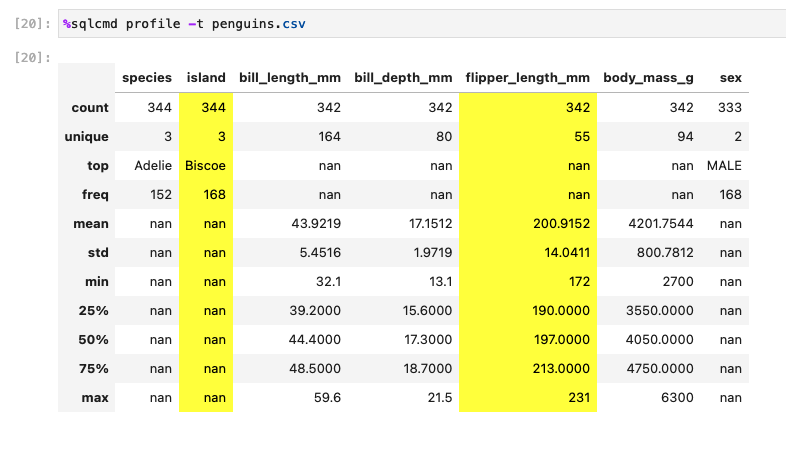
ok, I think I did something wrong because now when I profile penguins.csv I see it in yellow:

image

suggestion: can we make the yellow background softer? (the current one is too strong) the yellow one you show in the warning looks better, let's highlight the columns with the same color:

image

also, note that the warning shows.

`gender` <- backticks

can we change the backticks for something else? perhaps we can use

<code>column_name</code>

@AnirudhVIyer
Copy link
Author

ok, I think I did something wrong because now when I profile penguins.csv I see it in yellow:

image

suggestion: can we make the yellow background softer? (the current one is too strong) the yellow one you show in the warning looks better, let's highlight the columns with the same color:

image

also, note that the warning shows.

`gender` <- backticks

can we change the backticks for something else? perhaps we can use

<code>column_name</code>

Making the changes to the styling, don't know why penguins.csv has the yellow columns now, runs fine locally. I will check it out.

@edublancas
Copy link

Making the changes to the styling, don't know why penguins.csv has the yellow columns now, runs fine locally. I will check it out.

I think it's good that the island column in the penguins dataset is displayed on yellow, since we can't compute the statistics on strings. so let's keep it (if it's a bug, let's make it a feature 😂)

having said that, we can also display a message like:

the island column is a string type. cannot calculate a,b,c,d...

@AnirudhVIyer
Copy link
Author

Making the changes to the styling, don't know why penguins.csv has the yellow columns now, runs fine locally. I will check it out.

I think it's good that the island column in the penguins dataset is displayed on yellow, since we can't compute the statistics on strings. so let's keep it (if it's a bug, let's make it a feature 😂)

having said that, we can also display a message like:

the island column is a string type. cannot calculate a,b,c,d...
Screenshot 2023-06-22 at 10 26 37 AM Hey @edublancas , so I fixed the bug (it was some global css styling issue). We can add styling for categorical columns but i think it would make the table a bit shabby if there are many such columns.

For instance, in the churn dataset, most of the columns are categorical columns, where we calculate top, freq, unique and count. So I am not sure if we should add styling to categorical columns
Screenshot 2023-06-22 at 11 45 41 AM

@AnirudhVIyer AnirudhVIyer requested a review from edublancas June 23, 2023 17:30
@edublancas edublancas merged commit aa360f9 into ploomber:master Jun 23, 2023
Sign up for free to join this conversation on GitHub. Already have an account? Sign in to comment

Labels

None yet

Projects

None yet

Development

Successfully merging this pull request may close these issues.

sqlcmd profile improvements

4 participants