Resizer keyboard #3258
Resizer keyboard #3258
Conversation


|
Build successful! 🎉 |
|
Build successful! 🎉 |

| columns: GridNode<T>[] | ||
| } | ||
|
|
||
| export function useTableColumnResizeState<T>(props: ColumnResizeStateProps, state: ColumnState<T>): ColumnResizeState<T> { |
There was a problem hiding this comment.
should the signature actually be
interface Column {
  key: Key,
  defaultWidth: number,
  width: number,
  minWidth: number,
  maxWidth: number
}

interface ColumnState {
  columns: Column[]
}

export function useTableColumnResizeState<T>(props: ColumnResizeStateProps, state: ColumnState): ColumnResizeState<T> {
There was a problem hiding this comment.
Would this require extra changes to the TableCollection type definition? Wondering because we pass state.collection to this hook which has columns: GridNode<T>[]. Otherwise I guess we could construct an array of column data to match what you have above and pass that to useTableColumnResizeState, but what is the particular reason for the having the above interface?
There was a problem hiding this comment.
trying to decouple from our collections so someone could potentially use this with any table
There was a problem hiding this comment.
discussed with devon, i'll handle changing the interface in another PR
|
Build successful! 🎉 |

 LFDanLu
left a comment
LFDanLu
left a comment
LFDanLu
left a comment
There was a problem hiding this comment.
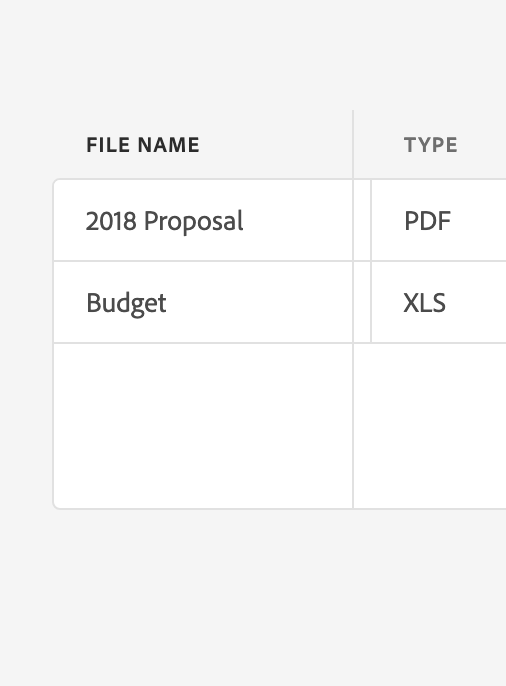
Out of scope of this PR perhaps, but I found the resizer not lining up with the divider to be kinda weird:
| columns: GridNode<T>[] | ||
| } | ||
|
|
||
| export function useTableColumnResizeState<T>(props: ColumnResizeStateProps, state: ColumnState<T>): ColumnResizeState<T> { |
There was a problem hiding this comment.
Would this require extra changes to the TableCollection type definition? Wondering because we pass state.collection to this hook which has columns: GridNode<T>[]. Otherwise I guess we could construct an array of column data to match what you have above and pass that to useTableColumnResizeState, but what is the particular reason for the having the above interface?
|
Build successful! 🎉 |
|
Build successful! 🎉 |

|
Build successful! 🎉 |
|
Build successful! 🎉 |

|
Build successful! 🎉 |
|
Build successful! 🎉 |
| let {pressProps} = usePress({ | ||
| // Disabled for allowsResizing because if resizing is allowed, a menu trigger is added to the column header. | ||
| isDisabled: !allowsSorting || isSelectionCellDisabled || allowsResizing, | ||
| isDisabled: (!(allowsSorting || allowsResizing)) || isSelectionCellDisabled, |
There was a problem hiding this comment.
have some resizing logic in here i'd like to move out if anyone has any ideas, may do in follow up
|
Build successful! 🎉 |
|
Build successful! 🎉 |

 reidbarber
left a comment
reidbarber
left a comment
reidbarber
left a comment
There was a problem hiding this comment.
LGTM, tested on Chrome, Safari, FF, and iOS Safari

|
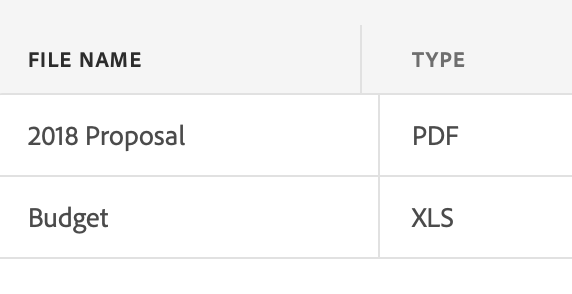
Looks good! A few minor things I discovered while testing, to address in followups.
|
|
Build successful! 🎉 |
 devongovett
left a comment
devongovett
left a comment
devongovett
left a comment
There was a problem hiding this comment.
Approving pending one update
|
Build successful! 🎉 |


Closes #3027
Closes #3026
The Resizer should only be visible during hover or after selecting resize from our Column Header menu.
You should be able to resize the column by hovering over it and clicking and dragging the Resizer.
You should be able to resize the column by keyboard navigating to the Column Header, opening the menu, and selecting resize. This should move focus to the resizer and then you can resize with the left and right arrow keys.
You should be able to resize the column by touching the Column Header with your finger to open the menu and selecting resize. Then touching and dragging the resizer left or right with your finger.
You should be able to cancel out of keyboard resizing using the Escape key or Enter key, which will return focus to the Column Header. Or, you can hit Tab/Shift+Tab to take you out of resizing mode and currently places you on the next cell.
Clicking elsewhere on the page or table should also take you out of keyboard resizing and edit mode.
In LTR, (this statement is flipped in RTL):
This PR also addresses our EW-resize cursor display. At min, it should only be an east resizer, at max it should only be a west resizer.
Notes: A partial implementation of edit mode was needed for this so that we could prevent grid navigation while resizing with the keyboard.
FocusScope changes were needed: contain can now be turned false in the middle of its life cycle, this was needed so that we could turn off containment in Menu's that are fading out. restoring focus should check if focus was lost before actually restoring.
✅ Pull Request Checklist:
📝 Test Instructions:
🧢 Your Project: