Incorrect Merchant Data Information or API is not working - "Λάθος στοιχεία εμπόρου ή το API δεν λειτουργεί." #351

Description

I need help with my website: www.hairstories.gr
My website is in Greek so I have included English translations.
It is on WordPress and I am using WooCommerce and the Plugin "VivaPayments WooCommerce Payment Gateway" by emspace.gr.
Below I have the Error Message that I get when I test my website, as well as the steps I followed to setup everything. Please respond back as soon as possible because this issue has been going on for almost 1 month now, and I am getting very frustrated. I am contacting Viva and they tell me to Contact Github. This is my 2nd time I am opening an Issue in Github, because the 1st time they told me that it's not their issue! I hope I finally get an answer! Thanks.
After setting up everything according to the respected instructions, I TESTED my site by trying to place an order, but it doesn't go thru. After I add item(s) in my Cart and then hit Proceed to Checkout and I select VivaPayments as an option, after I create an account and hit Pay Now, instead of being REDIRECTED to Viva's Secure website to I can complete the Order, it shows me the following message:
ERROR MESSAGE
(See Also Attached Pic)
Αριθμός Παραγγελίας: "Order Number"
380
Ημερομηνία: "Date"
Ιούνιος 16, 2017 "June 16, 2017"
Σύνολο: "Total"
€12.60
Μέθοδος Πληρωμής: "Payment Method"
VivaPayments Payment Gateway
Ευχαριστούμε - η παραγγελία αναμένει πληρωμή. Θα μεταφερθείτε αυτόματα στη Vivapayments για να πραγματοποιήσετε πληρωμή.
"Thank you. Your order is waiting to get processed. You will be automatically redirected to Vivapayments to complete your purchase."
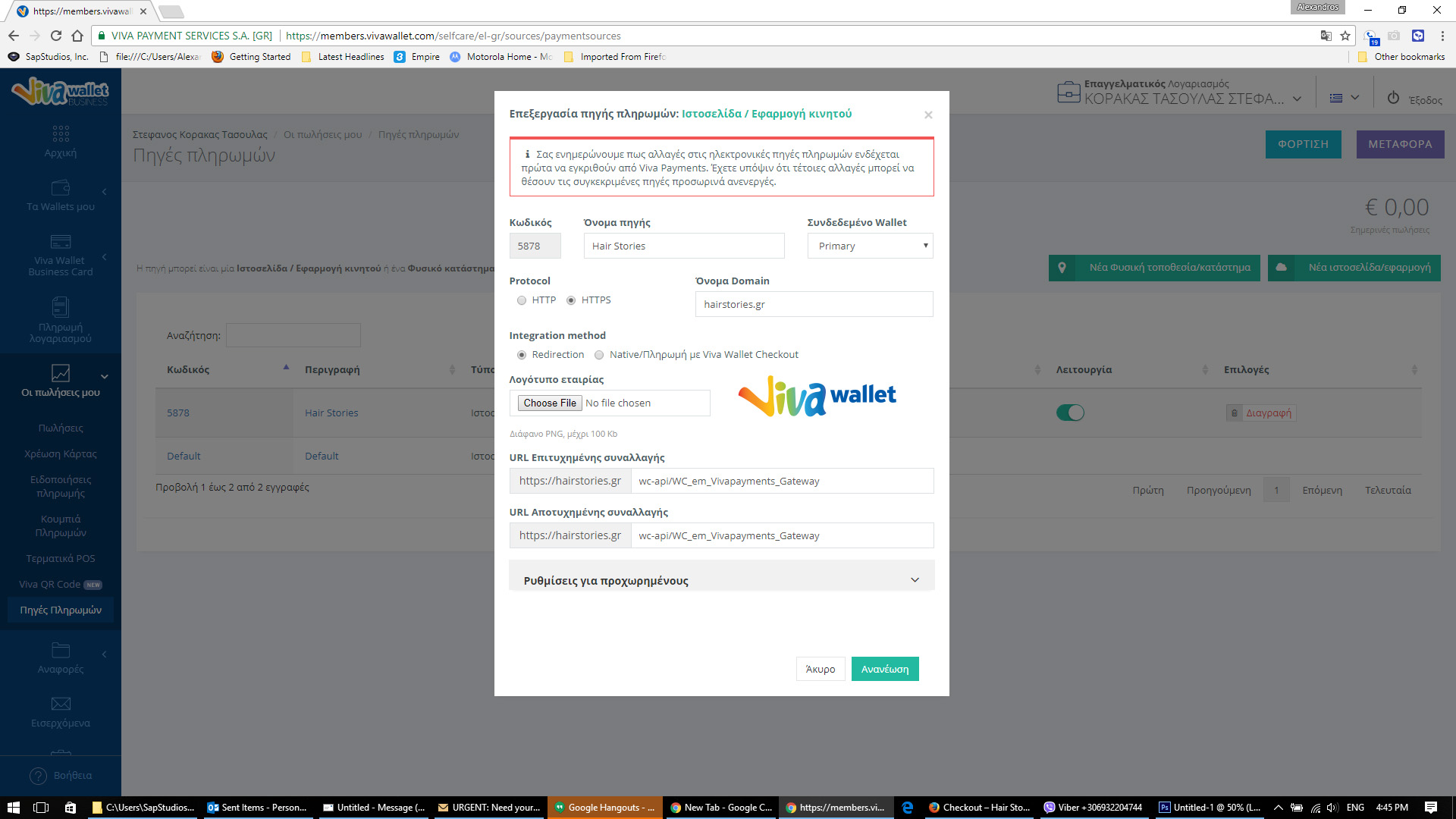
Steps I followed to SETUP Everything:
(See Also Attached Pic)
STEP #1:
From my Viva account I went and created a NEW Website/App "Πηγή Πληρωμών"
I put:
"Source Name" Όνομα πηγής: Hair Stories
"Linked Wallet" Συνδεδεμένο Wallet: Primary
Protocol: HTTPS
"Domain Name" Όνομα Domain: hairstories.gr
Integration method: Redirection
Τα URL Επιτυχημένης καί Αποτυχημένης συναλλαγής τα δημιούργησε αυτόματα.
"Success and Failure URL's were created automatically."
STEP #2: for Plugin setup
From my Viva Account I went to "Settings >> API Access" and copied the Merchant ID and API Key and input them into the Plugin, in their respected fields (VivaPayments Merchant ID and VivaPayments API key).
VivaPayments Codeld and Message to Customer I left blank.
Mode I left Check for Test Mode on "Ενεργοποίηση Test Mode"
I selected a Thank you page
Left payments to 1 "Δόσεις"
That's everything!!
Please someone respond with a solution!
Thank you!