SSR to resolve FOUC #1534
SSR to resolve FOUC #1534
Conversation


|
@jonahtanjz I noticed that Although it's not causing any problems, I'm not quite sure why they cannot be rendered but I suspect it may be something due to conditionals. Instead, these components are rendered on the client-side. And for pages which do not have siteNav or pageNav, it simply renders as a comment Just checking, do you know anything about this? If this should be the expected behaviour? :O |

Yup this should be the expected behaviour. Both As for the components rendering to a comment |
 wxwxwxwx9
force-pushed
the
ssr-resolve-fouc
branch
from
wxwxwxwx9
force-pushed
the
ssr-resolve-fouc
branch
from
5e6e1e9 to
67a9361
Compare
|
@jonahtanjz thanks for the clarification! I think we can keep it as it is :-) |

|
A side note: I'm wondering if this solution will cause a longer delay between the user request for the page and the first appearance of some visible content, thus making the website 'appear' slower. FOUC makes the page ugly at first but does it allow the user to start consuming page content sooner? Something to think about. |
|
@damithc Hi prof, thanks for raising this up! With SSR, content should be rendered faster since Vue doesn't have to compile on the browser-side. So conceptually, the user should be able to consume the page content sooner. The flow would look something like below. No SSR: Send page to user --> Vue takes over to compile and render pages into proper HTML --> browser render HTML May I ask if you are raising this because you tried out the netlify preview and found it slower? |
FOUC appears in which step? I was under the impression that it appears before the page is fully rendered, and hence, user gets to see something earlier.
When you demoed it last Monday, I had a fleeting impression that the page stayed blank a bit longer than what I'm used to. But I could be wrong. You can compare the two modes to get some data. |
|
The netlify preview seems alright though. So, might not be an issue after all. Still, worth investigating, to be sure. |
FOUC appears during the "Vue takes over to compile and render pages into proper HTML" step, which is essentially client-sider rendering. By doing SSR, we are taking away this load on the client's browser, by sending the rendered version of the HTML to the client so that the browser can immediately paint the DOM.
Hmm, it could be because my system was rather slow at that time.
Yup, I will look into this more! |

 ang-zeyu
left a comment
ang-zeyu
left a comment
ang-zeyu
left a comment
There was a problem hiding this comment.
Thanks, some suggestions:
Let's move toward organising the commits here as well (can do it once approved instead as well) as there's a few dependent but sideways-unrelated changes, suggest:
- Necessary precursor commits to avoid side effects (e.g. add
'v-pre', resolve navbar width, possibly the warning commits as well...) (as separate commits) - your actual ssr implementation
- remove temporary styles
| hideDropdownMenu() { | ||
| this.show = false; | ||
| $(this.$refs.dropdown).findChildren('ul').each(ul => ul.classList.toggle('show', false)); | ||
| this.nodeList(this.$refs.dropdown).findChildren('ul').each(ul => ul.classList.toggle('show', false)); |
There was a problem hiding this comment.
the "stubbing" can be done "automatically" using https://webpack.js.org/plugins/define-plugin/
There was a problem hiding this comment.
Can I check if you are suggesting me to use Webpack to "stub" the browser variables (e.g. window)?
Just to give more context for my workaround, the problem I faced was having window and document in NodeList. Webpack will raise errors about the undefined variables window and document during compilation.
Even though these variables are not supposed defined as we are not in a browser environment, a straightforward resolution would be to define these undefined variables so that Webpack would not raise errors about it.
However, by defining the window variable, we run into another issue where Vue would wrongly detect the environment as the browser environment and would try to execute some browser-related operations (e.g. reading userAgent property of window). Thus, I thought that defining window variable as an empty object would not be suitable workaround.

So the workaround that I decided on is to "define" browser variables such as window by passing it as parameters for use in NodeList, where window would only be passed in to create the NodeList instance during the mounting lifecycle in Vue, so Vue would not falsely detect the environment to be the browser environment.
Are you suggesting that there is perhaps an easier workaround by using Webpack?
There was a problem hiding this comment.
Can I check if you are suggesting me to use Webpack to "stub" the browser variables (e.g. window)?
Yup, this should be a rather common use case; Stubbing it for each individual usage might be a little tedious for future development.
However, by defining the window variable, we run into another issue where Vue would wrongly detect the environment as the browser environment and would try to execute some browser-related operations (e.g. reading userAgent property of window). Thus, I thought that defining window variable as an empty object would not be suitable workaround.
would defining it as undefined work? its probably safer as well, since things might get run on an empty object.
There was a problem hiding this comment.
Defining it as undefined would work, I just have to add some guard clauses whenever we try to read the properties of these undefined global browser variables (e.g. have to add a check for window before we read window.Symbol).
The outcome is essentially the same as my original implementation, but a lot more succinct and straightforward :-) Thanks for the suggestion!
There was a problem hiding this comment.
Sorry @wxwxwxwx9, realised I misread your reply here earlier after observing the current changes.
It should essentially just be a 2-line solution (setting up definePlugin) to allow webpack to compile the bundle.
i.e. the window && ... checks should not even be needed as it indicates ssr is hitting some part of the code it shouldn't be.
There was a problem hiding this comment.
@ang-zeyu I've tested it out and I think the problems stems from my usage of requireFromString, which does module compilation m._compile. This is the part which hits the code that you mentioned (and thus guard clauses are needed).
In view of this, I tried to look for an alternative to requireFromString (perhaps require the module directly?) but I don't think there's a clear alternative. I'm thinking that we still have to use requireFromString nonetheless because of how memory-fs works; its API only provides readFileSync so we can only get the string version of the module from webpack watcher.
Do you know if there's other ways around this? Or is it alright if we leave the guard clauses as they are currently?
packages/core-web/webpack.dev.js
Outdated
| serverCompiler.outputFileSystem = mfs; | ||
|
|
||
| let bundle; | ||
| const bundleFilePath = `${process.cwd()}/dist/js/markbindvue.min.js`; |
There was a problem hiding this comment.
cwd can be fickle here, let's use something more reliable
There was a problem hiding this comment.
Hmm yeah, I agree, now that you mention it. I've switched it to rootFolder by passing it down from cli/index, which should be more appropriate.
There was a problem hiding this comment.
@wxwxwxwx9 looking back (per the above issue), cwd might have been the correct use here, since the serverCompiler presumably treats process.cwd as the root.
If you have the time to recall and confirm this as well 😅 before I push a fix
| // reassign the latest updated MarkBindVue bundle | ||
| bundle = requireFromString(newBundle, ''); | ||
|
|
||
| Object.values(pageEntries).forEach(async (pageEntry) => { |
There was a problem hiding this comment.
could be handled by Site.js, especially since it has the list of pages already
There was a problem hiding this comment.
as mentioned, let's integrate this with #1513 as well since we're temporarily regressing to live-reload here. (maintaining hot-reload would be welcome as well though 😀)
There was a problem hiding this comment.
the page template needs to be edited as well:
(view page source)
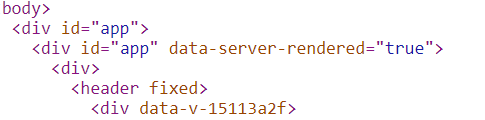
-- @wxwxwxwx9 Just occured to me while re-reviewing, this implies the html isn't getting hydrated actually, which is immediately causing a few issues. (the first id="app" is being targeted instead of the second which should be)

@ang-zeyu If I understand you correctly, you mean to remove This was what I initially went with as it seemed to be the correct approach. However, this led to some hydration issues that I can't seem to fix. This was causing Vue to bail hydration and execute client-side-rendering. However, I was not expecting there to be any hydration issues as the DOM was not modified past the SSR stage. While experimenting, I found that retaining for the SSR solved the hydration problem that I was facing (thus resulting in the html page source that you saw in the screenshot). While looking into this further, another weirder behaviour, perhaps, is that there are some modifications to the DOM which I would expect to cause hydration issues but they are not. Here is a collation of the behaviours I observed so far.
Even though SSR works and there are no hydration issues as of now, I'm not so clear on why the behaviours are as such; I will look into this more in the meantime. However, can I check with you if my understanding of hydration tallies with yours? Or is there some misunderstanding from my side? |

|
@wxwxwxwx9 if I'm getting your table right, all of the cases are because its not actually hyrdating (missing
|
@ang-zeyu Ah, I forgot to add that whatever is under the column "SSR App Template Input" will eventually have the
Regarding the above, can I check how did you get the error message? Is it with the current changes on this PR? I don't see the message appearing :O EDIT: I only get the hydration error message (as per your screenshot) when it's case 1 in the table. Currently, the changes on this PR is case 2, which doesn't have the error message in your screenshot. The rest of the cases also do not have the hydration error message (at least on my side), which I assume there to be no hydration issues (unless it's just not reporting for some weird reason). |
not the ssr app template, but the end html the client is receiving. (#1534 (review))
removing the outer
I would expect at least few here, particularly surrounding our use of bootstrap vue directives (these are known to cause ssr headaches, though I'm not sure if bootstrap-vue has mechanisms for it) for popovers and tooltips. I was rather surprised to find little to no side effects needing fixing here in fact (would be excellent if that's the case 😃😃), as so far we have been assuming client side rendering only. |
|
it may also help while testing to do:
|
|
@ang-zeyu ah, I see what you mean now!
Yeah, this was what I was missing. It has misled me believe that there were no hydration issues (but it's simply because the error doesn't appear due to mounting onto element without
Yep, actually I've been using this to check but it just didn't occur to me that I was facing hydration issue as I did not see the hydration error message (which was because of mounting onto an element which doesn't have |
wxwxwxwx9
force-pushed
the
ssr-resolve-fouc
branch
9 times, most recently
from
7dcf597 to
6e3f760
Compare

There was a problem hiding this comment.
@ang-zeyu Thanks for bringing the hydration issue to my attention :-)
Would just like to discuss with you some of my concerns / discoveries about the hydration issues revolving MarkBind.
From my observation, there seems to be 2 possible sources of hydration issues:
-
Server-side -- modifying the DOM after compiling it, and rendering the modified DOM. Thus, there will be a mismatch between the client-side application and the server-side generated HTML.
For example, after compiling our Vue page, if we beautify the SSR generated HTML, we will face hydration issues as we changed the DOM structure after compiling it, thus sending a "different" application to the client.
This also raises the question: would beautifying the SSR HTML even be possible now? I can't seem to see a way to do it without causing hydration issues 🤔
-
Client-side (User Syntax) -- there are some syntax that would cause hydration issues. I suspect it is due to a slight difference in the way Vue processes the HTML to create VNodes vs. the way
renderToStringfunction of SSR generated the HTML nodes.It would be easier to explain it with examples. Kindly refer to the changes I have made in the documentation to fix all the all user-syntax hydration issues that I discovered. I have resolved all the hydration issues in our existing documentation and
test_site. However, I'm not sure if I have captured all possible user-syntax cases that would cause hydration issues, although I think should have captured most of them, since the documentation andtest_siteare quite comprehensive.I also gave my thoughts on the causes of the hydration issues based on my investigation / observation. Let me know if any of my inference is wrong :-)
With that, it seems like we would have to impose some form of user compliance to syntax structure, so that hydration issues would not be triggered by user syntaxes. Or rather, would it be possible for us to "catch" all the user syntaxes that violate hydration rules, to process and fix them accordingly behind-the-scenes? Though this would be quite tedious in my opinion.
Penalty of hydration issues
Having said that, I'm not sure if the penalty of hydration issues is that expensive after all. I think the additional time cost comes in the time spent on hydration, only to find that the DOM structure does not match, thus wasting the time spent on hydrating and doing client-side rendering. So it will be "wasted time spent on hydrating + client-side rendering", instead of just client-side rendering.
Nevertheless, even if hydration fails for some reason, the FOUC should still be resolved. Because supposedly we are sending SSR HTML mark-up (pre-render) that is almost identical to the original Vue application sent to client.
Silent Failure of Hydration Issues when using Production Vue
I noticed rather often, that there were times when there were hydration problems reported on the developer console when I used development Vue but the same hydration problems were not reported when I use production Vue.
However, sometimes production Vue would report hydration issues with the following message: Failed to execute 'appendChild' on 'Node', which I assumed should be the "expected" behaviour.
After some research, I discovered that it is not necessary that production Vue will report hydration issues. Thus, it is unreliable to rely on production Vue to detect hydration issues; we should always use development Vue.
I am thinking that the impact on the user would be that they wouldn't know if they are experiencing hydration issues. Thus, they would not be aware if they incurring extra time cost of hydration failure and full client side rendering. They would also not be aware of how to fix it, even if they are aware/suspect that they are facing hydration issues. Furthermore, I'm not sure if we should even expose them to the concept of hydration issues in the first place.
May I know what you think about the concerns raised above?
Personally, I think the more problematic issue is about the user-syntax hydration issues which I don't see a good solution for, unless we process and fix the syntax on their behalf (which can be challenging on its own, need to do more research on this).
|
|
||
| 1. `External` — source files referenced in a `Page`, `Layout` or even another `External` that result in a <tooltip content="hence the class naming `External`">**separate**</tooltip> output file. These output files are loaded dynamically and on-demand in the browser. These instances are managed by a single `ExternalManager` instance. | ||
|
|
||
| <box type="info" seamless>For example, the file referenced by a `<panel src="xx.md">` generates a separate `xx._include_.html`, which is requested and loaded only when the panel is expanded.</box> |
There was a problem hiding this comment.
Same issue as having block-level elements nested within <p>.
There was a problem hiding this comment.
Needs newline for the sentence to be parsed as markdown.
packages/cli/test/functional/test_site/requirements/EstablishingRequirements.md
Outdated
Show resolved
Hide resolved
ang-zeyu
left a comment
ang-zeyu
left a comment
There was a problem hiding this comment.
This also raises the question: would beautifying the SSR HTML even be possible now? I can't seem to see a way to do it without causing hydration issues
hmm... might not even make much sense to beautify the ssr output as the author wouldn't be able to debug from it.
I think we can move toward introducing this as a breaking change (remove beautification) in v3, should also offset some build costs of introducing ssr.
With that, it seems like we would have to impose some form of user compliance to syntax structure
most of these (one exception below) seem like a manifestation of #958 (would have to be dealt with, preferably separately first).
We've never clearly defined how our components should behave as html tags (block / inline (default)) regarding markdown.
E.g. vuepress blanket defines every unrecognised tag as a block tag instead (https://github.com/vuepress/vuepress-next/tree/main/packages/%40vuepress/markdown/src/plugins/customComponentPlugin), then excluding inline exceptions.
This is a little more tricky in our case as <panel>s can behave as both block and inline tags
some paragraph
<panel minimized>I probably want this to be inline</panel>
...paragraph continuation...

// vs.

some paragraph
<panel>I probably want this to be block</panel>
some other components should almost definitely be block html tags (can whitelist / blacklist as such depending on the solution):
<box><question/quiz><dropdown><navbar><modal><searchbar><tabs/tab/tab-group>
some should probably be inline
<pic/thumbnail>- possible to rewrite these in terms of inline tags?- popover / trigger / tooltip - likely no issue as they render into inline tags already
Having said that, I'm not sure if the penalty of hydration issues is that expensive after all. I think the additional time cost comes in the time spent on hydration, only to find that the DOM structure does not match, thus wasting the time spent on hydrating and doing client-side rendering. So it will be "wasted time spent on hydrating + client-side rendering", instead of just client-side rendering.
Nevertheless, even if hydration fails for some reason, the FOUC should still be resolved. Because supposedly we are sending SSR HTML mark-up (pre-render) that is almost identical to the original Vue application sent to client.
Properly implemented, we should ensure this (bailing hydration) dosen't happen as best as possible. But yup - it would still resolve fouc eitherway. (e.g. if author introduces invalid html)
I'm not sure if we should even expose them to the concept of hydration issues in the first place.
yup. not something the user should be concerned with.
packages/cli/test/functional/test_site/requirements/EstablishingRequirements.md
Outdated
Show resolved
Hide resolved
|
@ang-zeyu thanks for the update!
Hmm, this seems related to the problem we are facing now. And yeah, we should look into this first to understand the behaviour of the bug better before we move on with any decisions for SSR. Just a summary of the remaining tasks related to this PR (for reference):
|
wxwxwxwx9
force-pushed
the
ssr-resolve-fouc
branch
from
76d3c6d to
b765721
Compare

|
Just a checklist to track the follow-up tasks for this SSR PR:
|
|
@wxwxwxwx9 one last nit: let's rebase the branch on the latest so the merge commit goes in immediately after - just to keep things tidy. |
Vue will raise warnings for the following:
- use of undefined variables in components
- use of un-provided injection variables
- compilation of unknown tags
- mutation of props
wxwxwxwx9
force-pushed
the
ssr-resolve-fouc
branch
from
b765721 to
063b9df
Compare
|
Added one more seventh item to the list that should be fixed before release. (#1534 (comment)) This requires storing of @wxwxwxwx9 Let me know if you're up for fixing this as well! |
@ang-zeyu Definitely! Let me look into this :-) |


4 participants


What is the purpose of this pull request?
This is a follow-up to PR #1512 and fully resolves #1406 and resolves #889 (FOUC).
In addition, by removing the temporary styles (which was in place to alleviate FOUC), this resolves #1472 as well, as the temporary styles are causing the bug raised in #1472.
Overview of changes:
Created
PageVueServerRenderer.jsto house all the Vue compilation and SSR-related functionalities.Introduced
vue-server-rendererdependency to enable SSR.In
Page.js, abstracted the page html output functionality fromgeneratefunction into a new functionoutputPageHtmlso that we are able to output the re-rendered pages upon changes in MarkBind's Vue component files (this will be elaborated in point 4 below).To integrate SSR into our setup and development workflow specifically, we have to modify our existing Webpack configuration accordingly. On a high-level, this was how the Webpack configuration was modified. We now have 2 bundled files, the entry points are
core-web/index.jsandcore-web/MarkBindVue.jsrespectively.The former bundle,
core-web/index.jsis basically what we serve to the client, so we call it theclientEntry. The latter bundle,core-web/MarkBindVue.jsis basically a bundle of all our Vue components, which we pass in to our node application (core library) and install it for the Vue instance for SSR, so we call it theserverEntry. Basically, theserverEntrybundle is a subset of theclientEntryentry bundle, as theclientEntrybundle also contains our Vue components, but it has more javascript code for client-side usage.When served in development mode (
-d), essentially what happens is that bothclientEntryandserverEntryare bundled.clientEntrycompiles the bundle and makes use ofwebpackDevMiddlewareandwebpackHotMiddlewareto pass intolive-serverto enable hot-reloading capabilities.serverEntry, on the other hand, compiles the bundle (in memory, usingmemory-fs) and watches the source file for any changes. Once changes are detected, it will trigger the callback functionupdateMarkBindVueBundleofPageVueServerRendererto provide the latest updated bundle, re-render all the built pages using the new bundle, and output the html files accordingly. Note that we also keep a record of the content of all built pages, so that we can simply re-render them whenever the bundle updates (so that we don't have to re-built the pages).To enable SSR, we have to make our code universal and only use browser-related API (e.g.
window/document) in suitable context. Thus, I had to make appropriate changes toNodeListand various Vue components that useNodeListto ensure our code is universal.Removed
tempStyleProcessorrelated stuff. Since SSR completely resolves FOUC, we do not need the interim hot-fix provided bytempStyleProcessoranymore.There are certain html tags like
<eq>frommarkdown-it-texmaththat are not recognized by Vue during compilation / rendering. Although it's unnecessary (there isn't any problems so far, except for warnings raised when we use the development version of Vue), I added av-preattribute to these nodes to let Vue know to ignore them during compilation. But then again, this may be unnecessary so I would like to get a second opinion on whether I should remove them :-).I noticed that the
Navbarcurrently do not take up the entire width of the viewport during loading. Thus, I added a minor css styling to fix it. I think it looks a lot better to have it always take up the entire width of the viewport.Extra Important Notes: The development workflow we have currently may be somewhat "flawed". Whenever our
serverEntrybundle updates, we will output the html of the re-rendered pages and this will trigger a live-reload aslive-serverwatches our output folder for changes. This live-reload will essentially override our hot-reload feature from Webpack. However, the good thing is that this does not affect the outcome of SSR in anyway. Thus, as discussed with @ang-zeyu, we can look to rectify / extend this in a future PR.Anything you'd like to highlight / discuss:
[BootstrapVue warn]: Multiple instances of Vue detected! You may need to set up an alias for Vue in your bundler config. See: https://bootstrap-vue.org/docs#using-module-bundlers. I tried various ways to resolve it (or even just disable the warning) but to no avail. I don't think this would affect the outcome of SSR in any way but I think it's good to remove it nonetheless. I'm not sure what we can do to resolve it in the context of our SSR use-case. Would anyone have any advice or knowledge about this? 🤔Testing instructions:
A few things to test (in development mode
-d, unless you generate the bundle incore-webusingnpm run build, then you can simply serve it without-d):npm run testServe our
docsfolder in development mode and browser through the pages of user guide / developer guide. None of the features should be broken. No errors / warnings (due to this implementation) should show up in the developer console. You should notice no FOUC in your the navigation of pages.docsfolder in development mode and make changes tocore-web/index.js. You should notice that hot-reload works properly. There should not be live-reload.docsfolder in development mode and make changes to any of our Vue components /core-web/MarkBindVue.js. You should see that live-reload is triggered and the updates should be reflected accordingly in the refreshed page.Proposed commit message: (wrap lines at 72 characters)
Implement SSR to fully resolve FOUC.
Rendering each Vue page to HTML string in the browser may be expensive
as it is possible for a page to get very large in size. This creates the
problem of flash-of-unstyled-content (FOUC) for the user which is
unsightly and may affect user experience. Although there are temporary
styles in place to tackle the problem, the FOUC problem largely remains.
Let's render every Vue page during build time to resolve FOUC and
remove temporary styles fix.
Checklist: ☑️