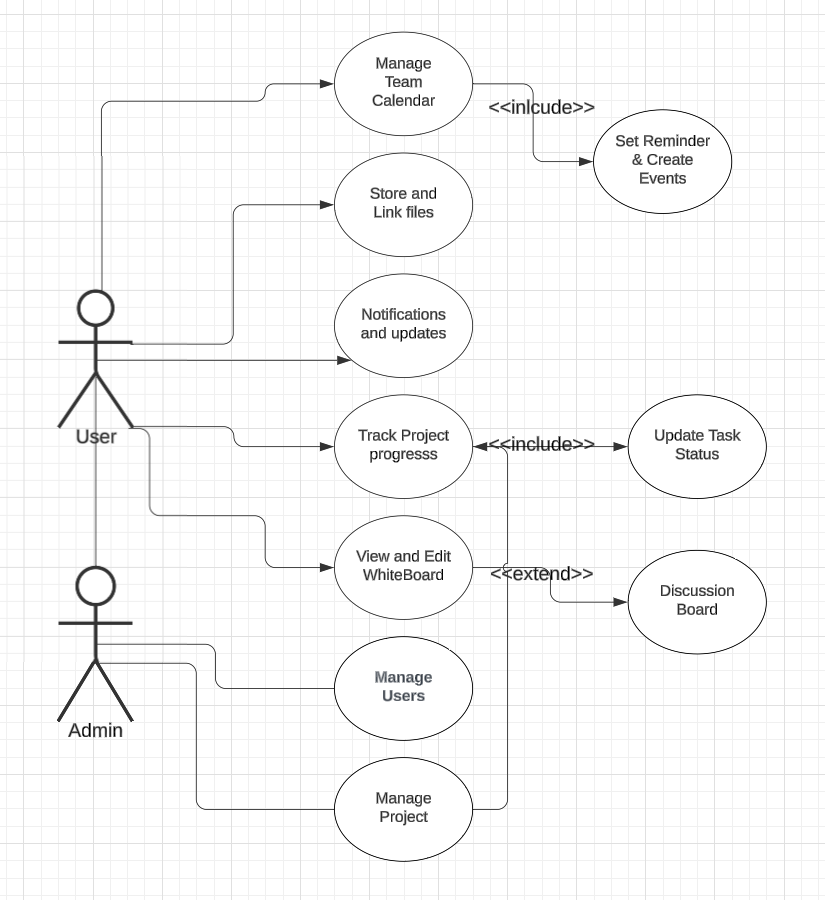
Whiteboard is a dynamic collaborative platform that allows users to manage group progress more easily. The goal of the Whiteboard is to offer a variety of features dedicated to making project management more visual, intuitive, and centralized.
Features include: There is an interactive “whiteboard” where individuals can write on “sticky notes” to brainstorm and problem-solve. There is a calendar where users can keep track of their meetings as tasks. There will be a pipeline where you can track progress and todos to see how close you are to your goal. Users can add and remove group members, and designate roles (admins or not) to users. There will also be an area to store project files. This feature was created to allow for a central space for teams to store their work.
- Project Tracker: GitHub Project Board – used for task management and project progress tracking.
- Version Control System (VCS): GitHub – to store code and manage version control.
- Database: PostgreSQL – relational database used for storing and managing data.
- UI Tools:
- Figma – for designing the user interface.
- HandleBars – for template management.
- Bootstrap – for responsive design and styling.
- Integrated Development Environment (IDE): VS Code – primary IDE used for development.
- Application Server: Node.js – for server-side scripting and handling application logic.
- File Upload Management: Multer – for handling file uploads within the application.
- Deployment Environment: Render – for hosting and deploying the application.
- Testing Tools:
- Mocha – for writing test cases.
- Chai – for assertions in tests.
- Framework: Express (in Node.js) – for building the server-side application.
- Primary Methodology: Agile – followed an iterative and incremental development approach.
Follow these steps to set up and run the project locally:
-
Clone the Repository
First, clone the repository to your local machine:git clone <repository-url>
-
Create the
.envFile
Navigate to theprojectSource codefolder and create a.envfile with the following contents:# Database credentials POSTGRES_USER="postgres" POSTGRES_PASSWORD="pwd" POSTGRES_DB="users_db" # Node vars SESSION_SECRET="super duper secret!" API_KEY="<TODO: Replace with your Ticketmaster API key if you are using lab 8 as a base>" -
Run Docker
In your terminal, navigate to the project foldercd /SoftwareDevProject/ProjectSourceCodeRun the following command to start the containers:
docker compose up -d
Your setup is complete! The project should now be running.
| Name | GitHub Username | |
|---|---|---|
| Ragan Lee | [email protected] | raaganl |
| Sepehr Rezaei | [email protected] | sepehrRez |
| Alexander Nguyen | [email protected] | TheAlexN |
| Quinn Turner | [email protected] | qturner390 |
| Ishita Mehta | [email protected] | Ishita7078 |
| Deep Singh | [email protected] | Prsi1503 |
You can track the progress of this project through the Project Tracker:
View Project Board

This project uses Mocha and Chai as the testing libraries to validate server-side endpoints and application logic.
Make sure you have Node.js installed on your machine. Before running the tests, ensure that all required dependencies are installed by running:
npm installOnce the dependencies are installed, you can execute the tests with:
npm testTest files are located in the ProjectSourceCode/test/server.spec.js
The testing dependencies include Mocha, Chai, and Chai-HTTP, which you can install using:
npm install mocha chai chai-http --save-devEnsure that the package.json has the following script defined under scripts:
{
  "scripts": {
    "test": "mocha ./src/test/server.spec.js"
  }
}
After setting this up, running:
npm testwill execute the test.